
AI autoblogging means using AI to find topics, write articles, and publish them to your blog with little or no manual work. Done badly, it fills a site with thin posts that nobody reads and Google ignores. Done well, it keeps a blog alive on weeks when you have no time to write.
What separates a good blog from junk is the checks around the AI.
This guide covers what autoblogging used to mean, what Google says about AI content today, how AI autoblogging compares to other tools, the quality gates that matter, what it costs, and a setup that works on WordPress. There is also a checklist you can use before every post goes live.
Table of Contents
What autoblogging used to mean
The word has baggage. For years, an autoblog was a site that copied other people’s content automatically. WPBeginner defines it plainly: an autoblog “is a website that automatically pulls content from other websites using RSS feeds,” and notes that “the term is mainly associated with content-scrapers and spam blogs.”
Those sites added nothing. They republished feeds, sometimes ran the text through a word spinner, and lived on whatever traffic they could get before search engines caught up.
AI autoblogging is a different thing. Instead of copying, the tool researches a topic and writes a new article. But the old reputation stuck, and AI autoblogging inherited it for a good reason: it is very easy to use AI the same way people used scrapers. Generate a lot of pages, publish them all, hope something ranks.
What Google actually says about AI content
Google does not ban AI content. It bans content made to game rankings, however it was made.
Its spam policy defines scaled content abuse as “when many pages are generated for the primary purpose of manipulating search rankings and not helping users.” It adds that this is typically “creating large amounts of unoriginal content that provides little to no value to users, no matter how it’s created.”
The examples Google lists include “using generative AI tools or other similar tools to generate many pages without adding value for users” and, in the same list, “scraping feeds, search results, or other content to generate many pages.” Old autoblogs and lazy AI autoblogging land in the same bucket.
Google’s guidance on generative AI content is just as direct about review: “It is critical to manually factcheck and review all AI-generated content for accuracy and trustworthiness before publishing.” That review also covers metadata: titles, meta descriptions, structured data, and image alt text.
Google keeps enforcing this. Its Search Status Dashboard lists spam updates in March, June, August, and September 2026. Google’s line on the September one: “Sites that violate our policies may rank lower in results or not appear in results at all.”
AI is allowed, and so is AI autoblogging. Unchecked, unoriginal, mass-produced AI content is not.
Does AI content rank?
It can. Ahrefs analyzed 600,000 pages ranking in the top 20 for 100,000 random keywords and found that 86.5% of them contained some AI-generated content. The correlation between how much AI a page used and where it ranked was 0.011, which Ahrefs called “effectively zero.” One caveat: Ahrefs used its own AI content detector, and its article notes that detectors always carry a risk of false positives.
Orbit Media’s 2026 survey of 1,042 content marketers points the same way from a different angle. 92.4% now use AI for blogging, yet “using AI does not improve content performance.” AI users and non-users were equally likely to report strong results.
Put those together and the picture is clear. AI alone does not sink a page, and the data does not show it lifting one either. What you publish decides how it does. (More numbers in our AI writing statistics roundup.)
AI autoblogging vs. classic autoblogs vs. AI writers
People use “autoblogging” for three very different things. Here is how they compare.
| Classic autoblog | AI writing assistant | AI autoblogging workflow | |
|---|---|---|---|
| Where the content comes from | Other sites, through RSS feeds | A prompt you write | Research on a topic picked for your niche |
| Is the text original? | No, it is copied | Yes | Yes |
| Checks sources first | No | Depends on the tool | It should, before writing |
| Publishes to WordPress | Yes, automatically | No, you copy and paste | Yes, as a draft or a post |
| Featured image and SEO fields | No | Depends on the tool | Yes, made with the article |
| Main risk | Spam and copyright problems | It still takes your time | Junk at scale if nobody checks it |
The last column is the one this guide is about. It saves the most time, and it is also the one that can do the most damage if the checks are missing.
The quality gates that separate a real blog from junk
Here is what AI autoblogging needs before it is worth running. If a tool or workflow skips these, you are building the kind of site Google’s spam policy describes.
1. A topic someone is actually looking for. Fresh, specific to your niche, and matched to what your readers ask. Rewriting the same trending headline every other site covered adds nothing.
2. Real sources, checked before writing. The model should work from sources it found and verified, not from memory. A model writing from memory will state wrong facts with full confidence, and nobody notices until a reader does.
3. Structure built for the reader. A clear answer near the top, headings that match real questions, and an FAQ only where it helps.
4. Links to your own articles. Internal links tell readers and search engines how your site fits together. A post with zero links to the rest of your blog is an island.
5. Clean metadata. Title, meta description, excerpt, categories, tags, and image alt text, all reviewed like the body, because Google says they should be.
6. A human review before publishing. Even with good checks, you read it. Add a line from your own experience where it fits. That review is what Google asks for, and it is what turns a generated draft into your article.
7. A pace you can review. Publishing 30 posts a week you never read is how sites get into trouble. Publishing two or three you have actually checked is how they grow.
We go deeper on each of these in the quality gates of an AI autoblogging workflow.
Signs your autoblog is publishing junk
If you already use AI autoblogging, look for these warning signs:
- Most of your titles follow the same pattern.
- Your posts cover the same news every other site covered that week, with nothing added.
- Your new posts never link to your older ones.
- Numbers appear with no source, or the source does not say what the post claims.
- The featured image has nothing to do with the article, or the alt text just repeats the title.
- Posts went live that nobody read first.
- In Google Search Console, more and more pages sit under “Discovered, currently not indexed.”
Two or three of these together usually mean the workflow needs fixing, not more posts.
What AI autoblogging costs
There are two ways to pay for AI autoblogging.
Subscription credits. Many AI writing tools charge a monthly plan with a set number of credits or words. Behind the scenes they pay the AI provider for tokens, then charge you a markup.
Bring your own key (BYOK). You connect your own API key from OpenAI, Google, Anthropic, or another provider, and pay them directly at their rates. The tool charges for the workflow, not the words.
For a blog publishing a few articles a week, the token cost of a single article is usually small. We broke down the real numbers per article and per model in what an AI article actually costs.
A setup that works on WordPress
Whatever tool you pick, a sane AI autoblogging setup on WordPress looks like this:
- Pick your categories first. Each category becomes a lane of topics. A clear lane keeps the blog on-topic instead of drifting into whatever is trending.
- Connect a model with your own key. If you use Gemini, turn billing on in Google AI Studio. Free-tier keys often return zero quota for search grounding, and nothing gets generated.
- Schedule a few slots a week. Pick days and times. The tool researches and writes in each slot.
- Let it save drafts, not published posts. At least at first. Read each one, fix what is off, then publish.
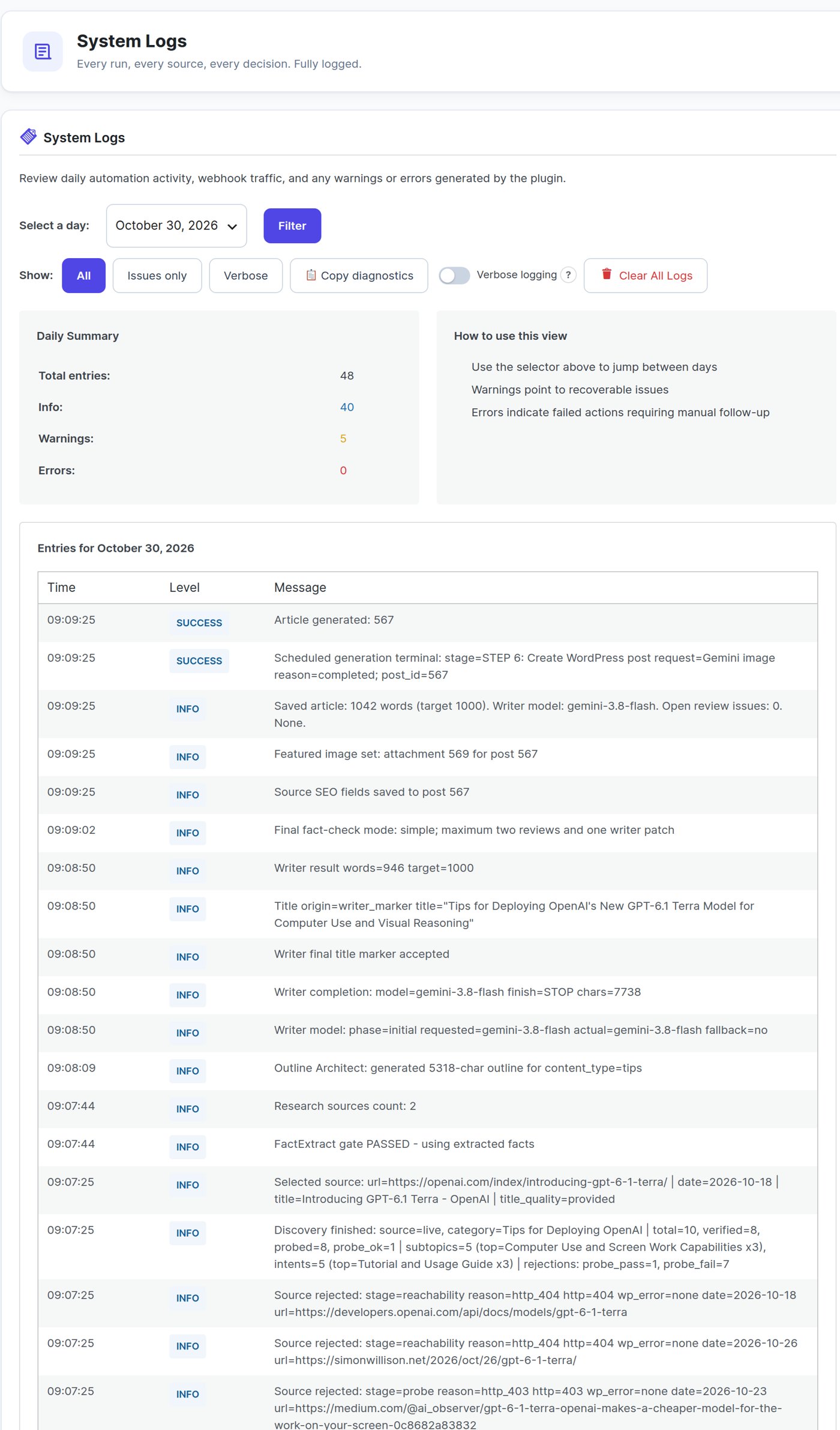
- Check the run log. A good tool shows what it did: which sources it used, what it wrote, and what failed.
- Move to auto-publish only when you trust it. After a few weeks of drafts you barely touch, auto-publish makes sense. Not before.
This is the AI autoblogging workflow we built Draft2Publish-AI around. It is a WordPress plugin that finds a topic in your category, checks its sources before writing, writes the article with internal links to your existing posts, fills in the SEO fields for Yoast or Rank Math, makes a featured image that fits the article, and saves it as a draft or publishes it. It runs on your own API key with zero markup. The free version on WordPress.org runs on Gemini and writes drafts on up to three scheduled days a week, one article a day. Auto-publish is a Pro feature.
If you are comparing tools, we also put together a list of autoblogging tools for WordPress and what each one actually does.
A checklist before every AI article goes live
Copy this AI autoblogging checklist and run through it for each post:
- The topic matches one of your categories and a question your readers ask.
- Every number and quote links to a source, and you opened at least the key ones.
- The first paragraph answers the question in the title.
- The post links to at least two of your own related articles.
- The title and meta description are accurate, not just catchy.
- The featured image fits the topic, and its alt text describes the image.
- You added at least one line from your own experience.
- You would be fine with a reader checking any claim in it.
Who AI autoblogging is for
It works well for niche and affiliate sites, small business blogs, authors and creators who want a blog that supports their main work, and agencies that manage many client blogs.
It is a poor fit for breaking news that needs real reporting, and for medical, legal, or financial advice that needs an expert to review every word. You can still use AI there, but not on autopilot.
See it on your own site
Get a free sample article for your site
- Finds and verifies sources before it writes
- Links to articles already on your site
- Makes a featured image that fits the article
- Saves it in WordPress as a draft for you to review
How often should an AI autoblog publish?
Less often than you think. With AI autoblogging, a new or small blog does not need a post every day. Two or three good articles a week, each one reviewed, will do more than seven you never read.
Search traffic to a new blog takes months to build either way. A steady pace of useful posts is what compounds. A burst of thin ones is what gets a site flagged.
Frequently asked questions
Is AI autoblogging allowed by Google?
Yes, as long as the content helps readers. Google’s spam policy targets pages made mainly to manipulate rankings “no matter how it’s created,” and its AI guidance asks you to fact-check and review AI content before publishing.
Will Google penalize my site for AI content?
Not for using AI. Ahrefs found no meaningful link between how much AI a page used and its ranking. Sites get hurt for publishing large amounts of unoriginal, low-value content.
Can AI autoblogging run fully on autopilot?
It can, and some tools including ours offer auto-publish. We recommend starting with drafts and reviewing each article until you trust the output. Google’s own guidance calls that review critical.
How many AI autoblogging articles should I publish per week?
For most small and new blogs, two or three reviewed articles a week is plenty.
What should I look for in an autoblogging AI tool for WordPress?
Look for the checks, not just the writing: source verification before it writes, internal links to your own posts, a featured image and SEO fields, drafts you can review, and a run log that shows what it did. Also check whether you pay through your own API key or through marked-up credits.
What is the difference between an autoblog and an AI blog?
A classic autoblog copies content from other sites through RSS feeds. An AI autoblog writes new articles. Google treats both the same way if they are mass-produced without adding value.
Sources
- Google Search Central, “Google Search’s guidance on using generative AI content”
- Google Search Central, “Spam policies for Google web search” (scaled content abuse)
- Google Search Status Dashboard
- Search Engine Roundtable, “Google September 2026 spam update done” (Oct 8, 2026)
- Ahrefs, “AI-Generated Content Does Not Hurt Your Google Rankings (600,000 Pages Analyzed)” (July 7, 2025)
- Orbit Media, “Blogging Statistics 2026” (Sep 8, 2026)
- WPBeginner, “How to Create an Autoblog in WordPress” (Apr 24, 2025)